Install MeGooLive Streaming App
After we setup our SSL for our domain, we now need to install the Media Server Applications that will be use to receive the stream, and then broadcast it to the viewers, the Node Media Server is the best choice for this it has features like HLS, DASH, and RTMP, but we have customized it to work with MeGooLive Streaming App.
Install Node Media Server
We have Customized the Node Media Server to work with MeGooLive Streaming App, it has a custom API that MeGooLive Streaming App will use, before installing it, make sure you have Already Installed Docker on you Droplet Server.
- Install Custom Node Media Server
Before running the command below, make sure to replace the API_URL with your domain name. In the example below, the domain name is "dancingwhale.my.id" - you should replace this with your own domain name.
docker run -d -p 8000:8000 -p 1935:1935 -p 8443:8443 -e API_URL="https://dancingwhale.my.id" --name node-media-server amsyari/node-media-server:latest
The docker command above runs the Node Media Server container with the following port mappings:
- Port 8000: Used for HTTP API and web interface
- Port 1935: Used for RTMP streaming (where streamers send their live video)
- Port 8443: Used for secure HTTPS connections
And for the node-media-server tag, we use 1.1 because it is the latest version, you can check the latest version here.
- to check if the Node Media Server is running, you can use the following command:
docker ps
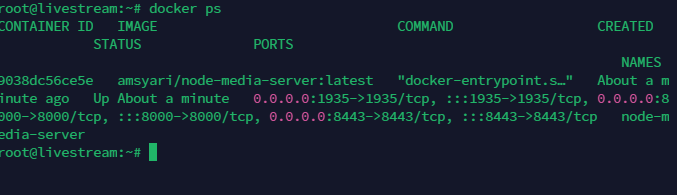
Now our Node Media Server is running, but we stil cannot access the Api with our domain name, it's only running on our Droplet Server locallys, we need to setup the Nginx to forward the request to the our newly installed Node Media Server.