Setup SSL Domain
SSL (Secure Sockets Layer) is a security protocol that encrypts data between your streaming server and viewers. We need SSL because:
- It keeps your stream data secure and private
- Modern browsers require it for streaming features
- It shows viewers your stream is trustworthy with the padlock icon
We'll use Let's Encrypt to add free SSL Certbot to your domain, it's mandatory for our streaming server to use SSL, let's start to setup the SSL Domain.
Step 1: Install Certbot
To install Certbot, we can run the following command:
sudo apt install certbot python3-certbot-nginx
Step 2: Enable HTTPS Firewall
we need to enable the HTTPS Firewall to allow the SSL to work, first we need to check if the firewall is enabled, if not, we can enable it by running the following command:
sudo ufw status
if the status is inactive, we can enable it by running the following command:
sudo ufw enable
After that we need to allow the HTTPS Firewall by running the following command:
sudo ufw allow 'Nginx Full'
If you are authenticated using SSH to this server, you need to allow port 22 in the firewall, because all your SSH connection will be blocked if you don't allow it, you can do this by running the following command:
sudo ufw allow 22/tcp
sudo ufw reload
to check if the firewall is enabled, you can run the following command:
sudo ufw status
Step 3: Run Certbot
Now we need to run Certbot to setup the SSL Domain, we can run the following command:
sudo certbot --nginx -d dancingwhale.my.id
Change the domain name to your own domain name, here dancingwhale.my.id is the domain name that we will use.
Step 4: Enable Auto Renew Certbot
Our certbot ssl is active for 90 days, and it will be expired after 90 days, so we need to enable the auto renew certbot, but sometimes depending on the certbot version you use, the renewal is already enabled, you just need to check it by running the following command:
sudo systemctl status certbot.timer
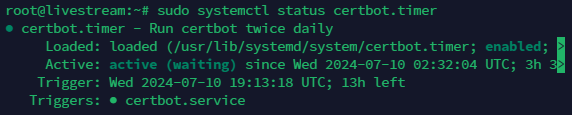
- to check the renewal of certbot will run or not, you can run the following command:
sudo certbot renew --dry-run
- if no error, it means the renewal is working and will renew our sll automatically.
After we setup the SSL Domain, next we will setup the MeGooLive Streaming App